So you installed everything, try to run the ODI studio and you get:
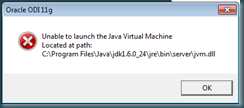
“Unable to launch the Java Virtual Machine”…
The problem is, that ODI studio needs a 32 bit version Java Virtual Machine.
So install a 32 bit JDK.
you still will get a 
you first need to edit odi.conf file:
Go to $ODI_HOME\oracledi\client\odi\bin folder
and open odi.conf file:

edit the line SetJavaHome C:\Program Files\Java\jdk1.6.0_24 to your 32 bit javahome:

et voila:

Why is this happening?
You have to realize that ODI Studio is a client component, developed for a “normal” client. 'Ideally' Client components have no place on server……..
Till Next Time


 Posts
Posts

